

Find out what posts contain a certain block
Sometimes you may encounter a Gutenberg block that cannot be translated by the plugin (see Can all Gutenberg blocks be translated?). In such cases, you'll need to identify all posts containing that block so you can migrate them to a different, translatable block.
Since Gato AI Translations for Polylang runs Gato GraphQL under the hood, you can conveniently execute GraphQL queries to search through your content.
To execute GraphQL queries, you must first enable the Advanced Mode and access the Queries CPT. See Creating Helper Queries for instructions on how to enable Advanced Mode.
Creating the GraphQL query
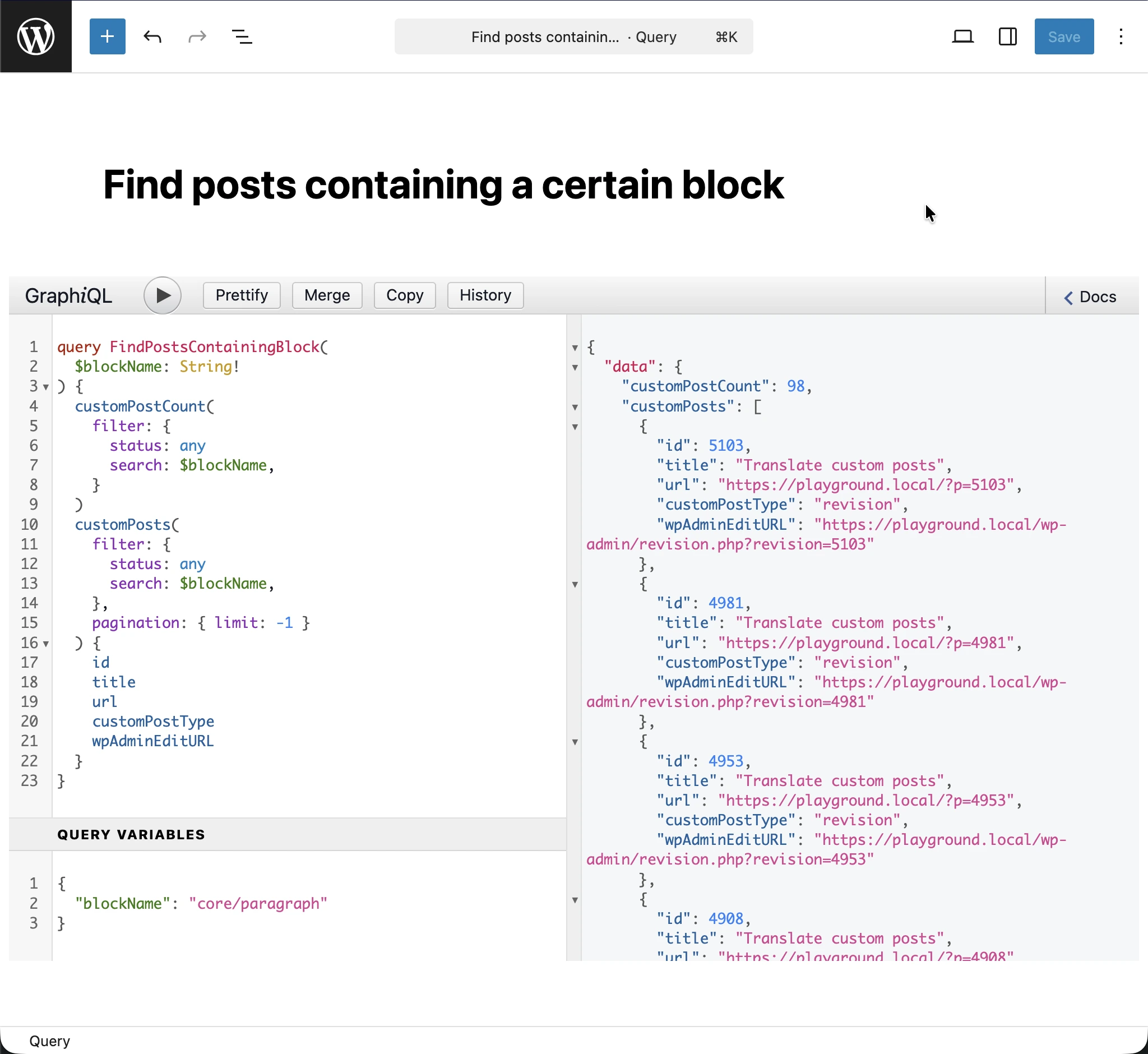
Navigate to Queries in your WordPress admin menu and add a new entry. Give it a descriptive title like "Find posts containing a certain block".
Then, paste the following GraphQL query:
query FindPostsContainingBlock(
$blockName: String!
) {
customPostCount(
filter: {
status: any,
search: $blockName
}
)
customPosts(
filter: {
status: any,
search: $blockName
},
pagination: { limit: -1 }
) {
id
title
customPostType
url
wpAdminEditURL
}
}Setting the GraphQL variables
Before executing the query, you need to provide the blockName variable. The block name follows the format namespace/block-name.
For example, to find posts containing the Yoast FAQ block, set the GraphQL variables to:
{
"blockName": "yoast/faq-block"
}To find the exact block name, you can inspect the block in the Gutenberg editor or check the block's documentation.
Executing the query
After setting the GraphQL variables, execute the query. The response will include:
customPostCount: The total number of posts containing the blockcustomPosts: An array of all matching posts with their details
Example response
{
"data": {
"customPostCount": 6,
"customPosts": [
{
"id": 38602,
"title": "BTS B",
"customPostType": "page",
"url": "https://www.mysite.com/bts-dietetique-b/",
"wpAdminEditURL": "https://www.mysite.com/wp-admin/post.php?post=38602&action=edit"
},
{
"id": 38024,
"title": "Merci",
"customPostType": "page",
"url": "https://www.mysite.com/merci/",
"wpAdminEditURL": "https://www.mysite.com/wp-admin/post.php?post=38024&action=edit"
},
{
"id": 38633,
"title": "BTS A",
"customPostType": "page",
"url": "https://www.mysite.com/bts-dietetique-a/",
"wpAdminEditURL": "https://www.mysite.com/wp-admin/post.php?post=38633&action=edit"
},
{
"id": 34871,
"title": "Collagène marin B",
"customPostType": "page",
"url": "https://www.mysite.com/meilleurs-collagenes-marin/",
"wpAdminEditURL": "https://www.mysite.com/wp-admin/post.php?post=34871&action=edit"
},
{
"id": 34853,
"title": "Collagène marin A",
"customPostType": "page",
"url": "https://www.mysite.com/meilleur-collagene-marin/",
"wpAdminEditURL": "https://www.mysite.com/wp-admin/post.php?post=34853&action=edit"
},
{
"id": 33987,
"title": "Meilleur collagène en 2025 : l’avis d’un médecin (15 marques)",
"customPostType": "page",
"url": "https://www.mysite.com/meilleur-collagene/",
"wpAdminEditURL": "https://www.mysite.com/wp-admin/post.php?post=33987&action=edit"
}
]
}
}Click on any wpAdminEditURL link to directly open that post in the WordPress editor. Then navigate to each post and replace the problematic block with a translatable alternative.